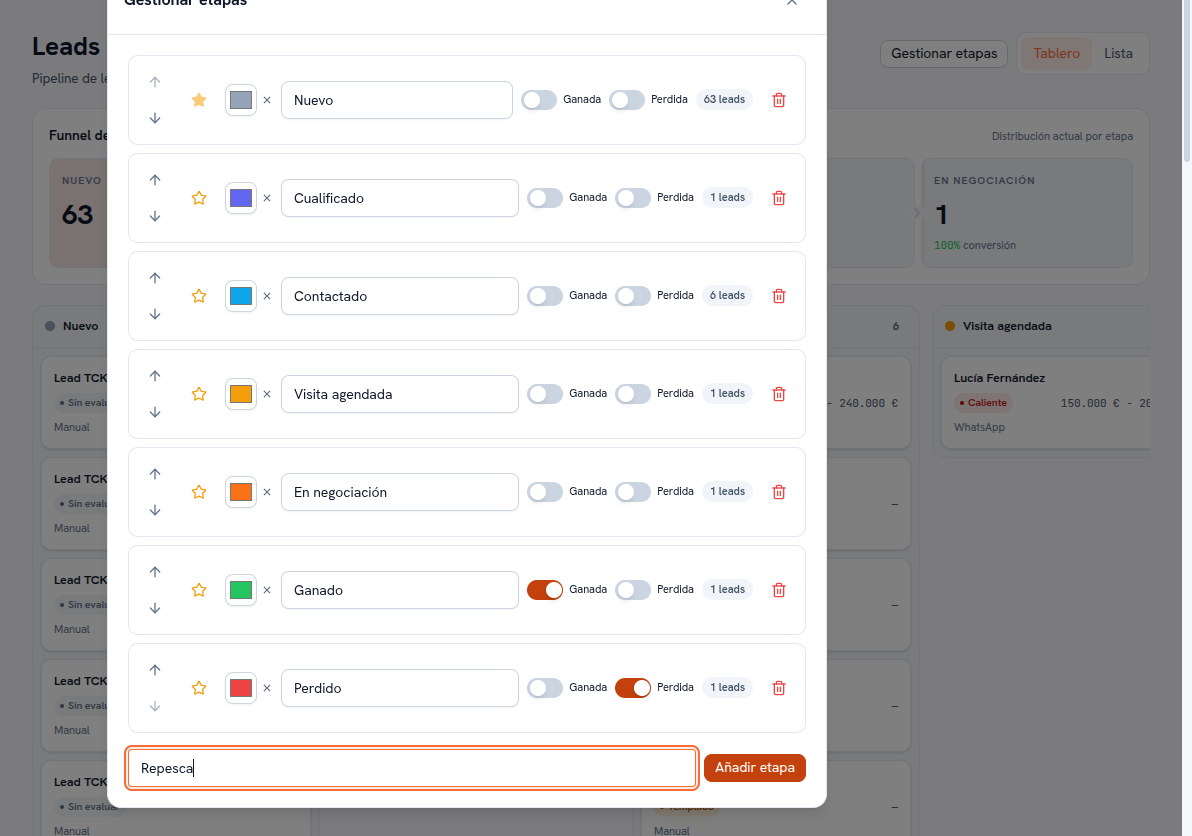
The “Manage stages” button, next to the Board/List selector, opens the panel where your agency adapts the funnel to how it works. It’s only available to the Admin and Editor roles.
Requirements: administrator or editor role.
- Tap “Manage stages” on the Leads screen.
- In each stage’s row you’ll find: the ↑ / ↓ arrows to reorder it within the funnel, a star to mark it as the entry stage, a color swatch (tap to change it), a text field with its name (editable), the Won and Lost toggles, the number of leads it currently holds, and a trash icon to delete it.
- To create a new stage, type its name in the field at the end of the panel (e.g. “Re-engage”) and tap “Add stage”.
- To rename, recolor or reorder an existing stage, edit it directly in its row; changes save instantly.
Result: the Board and the Conversion funnel instantly reflect the new order, name and color of your stages.
Two special flags on every stage:
- The Won and Lost flags mark your funnel’s terminal stages — that’s where revenue analytics comes from (manual 21 · Analytics).
- The star marks the entry stage, where new leads land. There’s always exactly one: to change it, mark the star on another stage and it stops being marked on the previous one.
Warning — Deleting a stage never loses a lead
If you try to delete a stage that still has leads in it, the platform first asks which other stage you want to move them to before completing the deletion. The funnel’s last stage and the entry stage can’t be deleted.