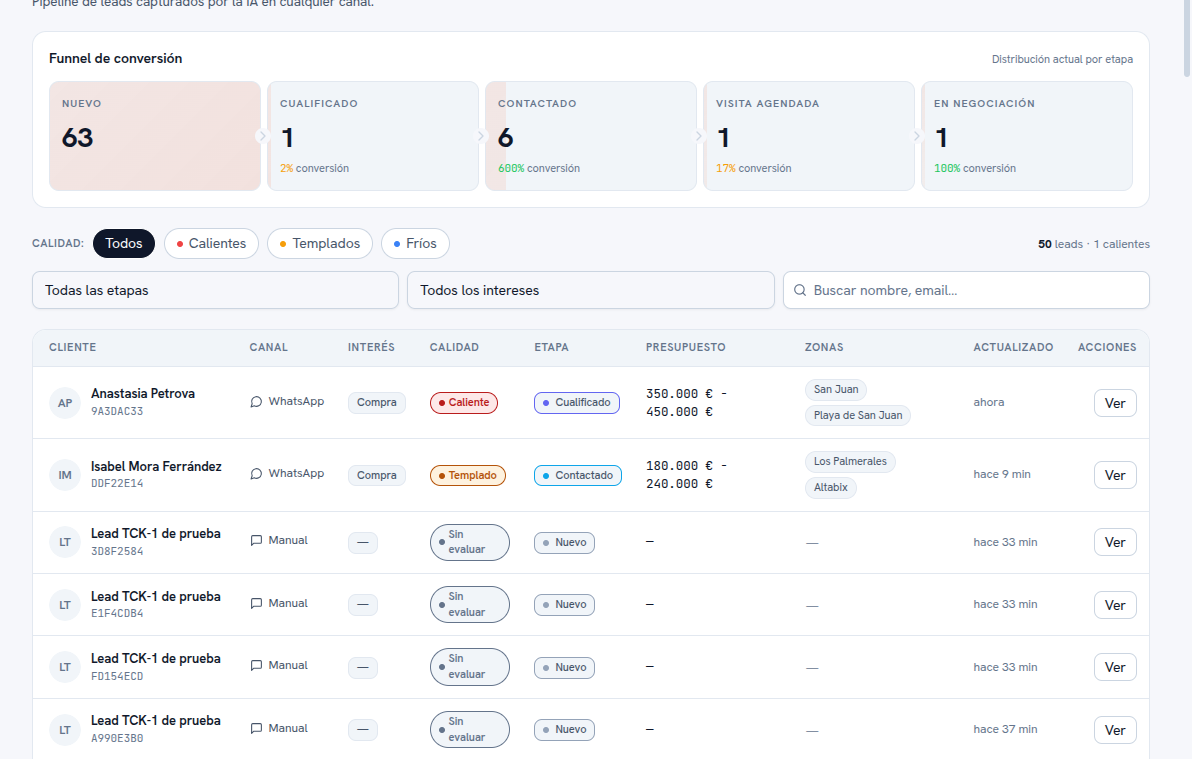
Tap “List”, next to the view selector, to switch to the classic table. The header with the Conversion funnel stays the same as on the Board (section 2); below it are the filters and the detail table.
The filters available, all of which apply only to the List (the Board always shows the whole funnel):
- Quality: All, Hot, Warm or Cold tabs.
- All stages: dropdown to narrow by a specific funnel stage.
- All interests: dropdown to narrow by the lead’s type of interest (for example, buying or renting).
- Search: finds a lead by name or email.
At the top right of the table, a counter summarizes the current filter’s result (for example, “50 leads · 1 hot”).
The table’s columns: Customer (name and a short identifier below it), Channel (WhatsApp, Telegram, Web or Manual), Interest, Quality, Stage (with the name and color your agency gave it), Budget, Areas (interest-area tags), Updated (how long since it was last modified) and an Actions column with the “View” button to open the full record.