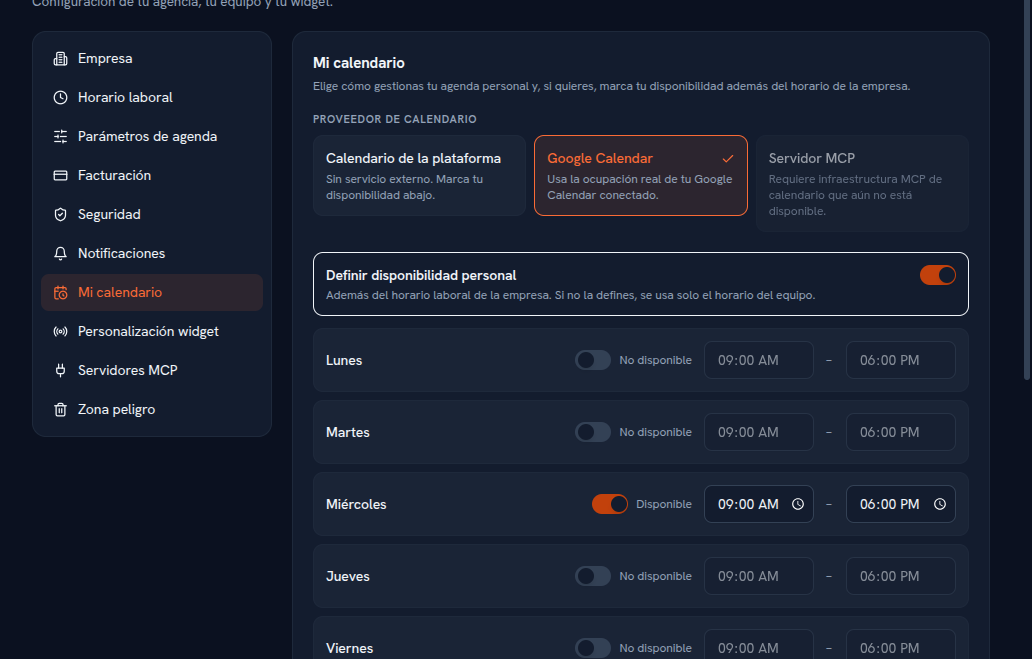
From Settings → My calendar, every person — whatever their role — chooses how they participate in the slot engine, without needing to be an administrator.
Requirements: none in particular; each person manages their own calendar from their own account.
There are three calendar provider types to choose from:
| Type | What it does |
|---|---|
| Platform calendar | No external service: your availability comes only from the agency’s business hours plus any personal availability you define below. |
| Google Calendar | On top of the above, it uses your Google Calendar’s real occupancy (free/busy) to avoid offering slots you already have busy, and mirrors your appointments onto it (section 7). |
| MCP server | Shows up disabled: the MCP calendar infrastructure it needs isn’t available yet. |
Below the provider selector, the “Set personal availability” toggle lets you mark, day by day, whether you work that day (Available / Not available toggle) and in which time slot, always within the agency’s business hours. If you don’t define anything here, only the team’s schedule is used.