
Who it’s for: any business that books appointments with customers — visits, calls, demos — and wants its AI agent to offer and confirm them without anyone on the team having to look at a calendar.
What the end customer sees
Section titled “What the end customer sees”When the customer asks for an appointment during a WhatsApp, Telegram or web chat conversation, the agent checks the exact same slot engine your team uses when creating an appointment by hand, and only ever offers real times, never made up. The AI never reveals what’s in your calendar — it doesn’t say what appointments exist or with whom — it only negotiates free slots. If the customer confirms one, the AI books the appointment directly, with nobody on your team needing to step in.
Steps in the product
Section titled “Steps in the product”-
Set your working hours and calendar parameters (slot length, buffer between appointments, minimum notice and how many days ahead) from Settings — your admin sets these, and they affect every slot offered, whether created by hand or by the AI.
-
Each person connects their own calendar, if they want to. From Settings → My calendar, anyone can pick from three providers: the platform’s own calendar (no external service), Google Calendar (uses your real busy/free status and mirrors your appointments), or an MCP server (disabled today, the needed infrastructure isn’t available yet).
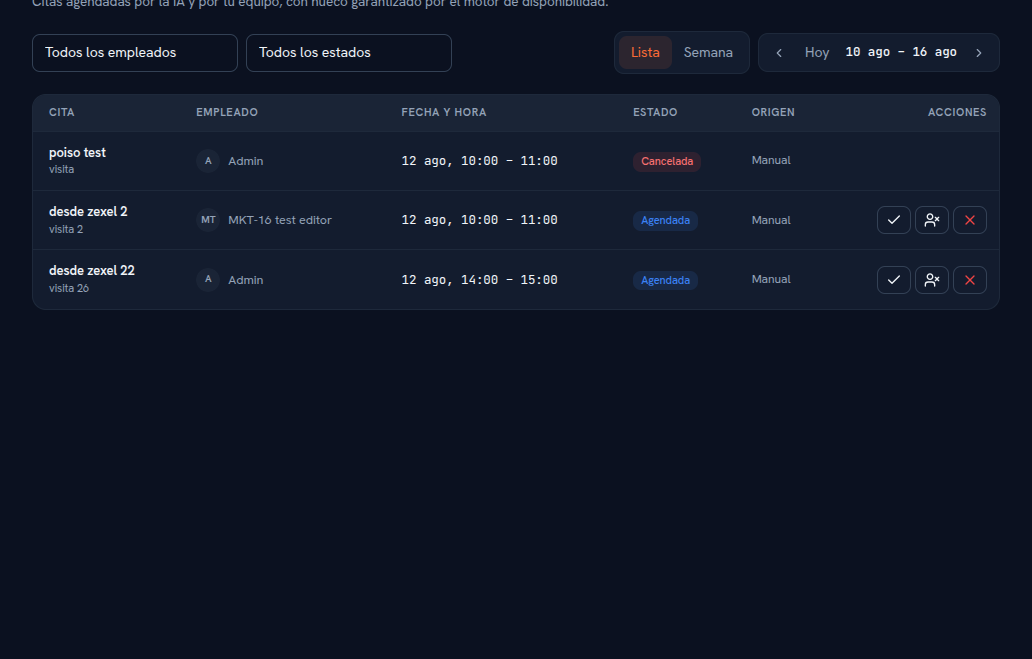
The Source column tells apart appointments created by hand (Manual) from ones the AI booked on its own during a conversation. -
Connect Google Calendar, if you use it. Choose the Google Calendar provider and grant consent — it only asks for your free/busy status and permission to manage the events the platform itself creates, nothing else from your calendar. Every appointment assigned to you is also created there, and updated or cancelled the same way if it changes on the platform.
-
A customer asks for an appointment in a conversation. The agent checks working hours, the parameters, your personal availability, and your real Google Calendar busy status (if connected), and only offers genuinely free slots.
-
The customer confirms a slot and the AI books it directly. The appointment shows up on the Calendar screen with AI as its source and Scheduled as its status, assigned to the right employee — with nobody on your team needing to do anything.
-
To create an appointment by hand, press “New appointment”, choose an employee and a date, pick one of the available slots the same engine calculates, add a title and type, and confirm.
-
Change an appointment’s status (Completed, Cancelled or No-show) from its own action icons in the table, when it applies.
What to configure
Section titled “What to configure”- Working hours and calendar parameters: set by your admin, the same for manual and AI appointments.
- Personal calendar: each employee picks their provider (platform or Google Calendar) from their own Settings.
- Personal availability: optional, day by day, always within the agency’s working hours.
Limits and honesty
Section titled “Limits and honesty”- Today there’s only real integration with Google Calendar — there’s no sync with Microsoft Outlook/365 or any other external calendar.
- The “MCP server” calendar provider shows up in the picker but is disabled: the infrastructure it needs isn’t available yet.
- With Google Calendar connected, an appointment mirrors into the calendar of the employee it’s assigned to, not whoever created it — if you assign an appointment to someone without Google connected, it still exists normally on the platform but won’t show up in any Google Calendar.
- Overlapping appointments aren’t allowed: the slot picker only ever offers genuinely free times.
See also
Section titled “See also”- Calendar and appointments — the full detail of views, statuses and slot calculation.
- Conversations — where to find the conversation an appointment was booked from.
- Tickets and internal follow-up — when an appointment also needs an internal follow-up case.