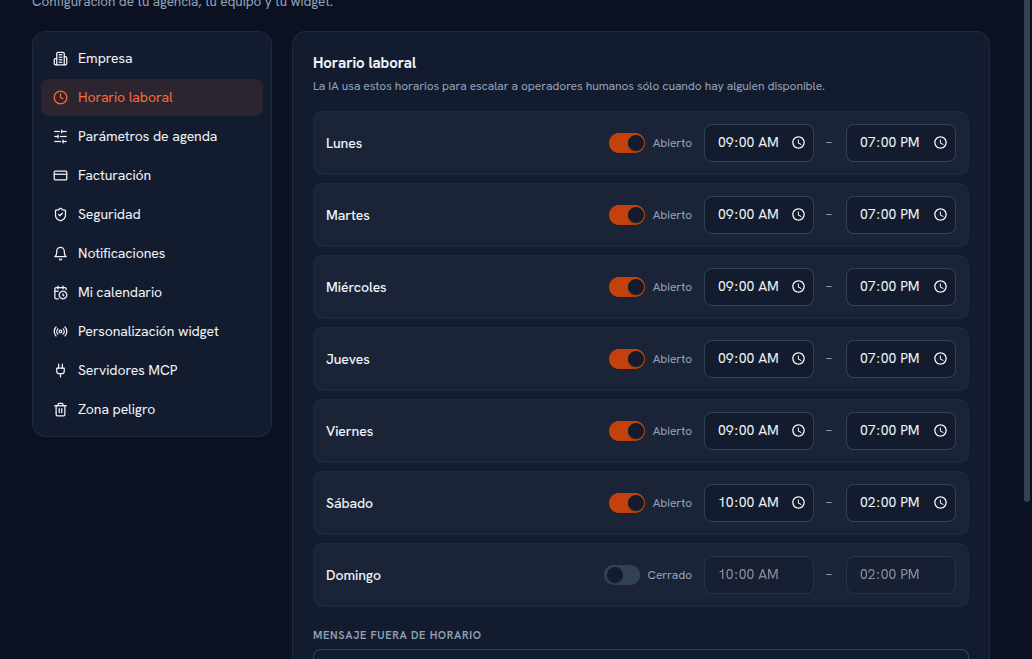
Define your agency’s schedule. This schedule feeds two things: the “outside hours” notice on your website’s widget, and the Calendar’s (Manual 19 · Calendar) available-slots engine for offering and creating appointments.
Requirements: Admin role.
- Go into Settings → Business hours.
- For each day of the week, turn the Open / Closed toggle on or off.
- On open days, adjust the start and end time range.
- Type the outside-hours message — the text whoever writes to you over chat will see while the business is closed; if you leave it empty, the chat doesn’t show any customized outside-hours message.
- Tap Save changes.
Result: the widget starts showing your outside-hours message when applicable, and the Calendar stops offering slots outside your business hours.
Note — Your personal calendar is separate
This schedule is agency-wide. Each specific person’s availability — which days they work and with which calendar provider, including the Google Calendar connection — is managed by each person from their own Settings → My calendar, not from here: full detail is in Manual 19 · Calendar, sections 6 and 7.