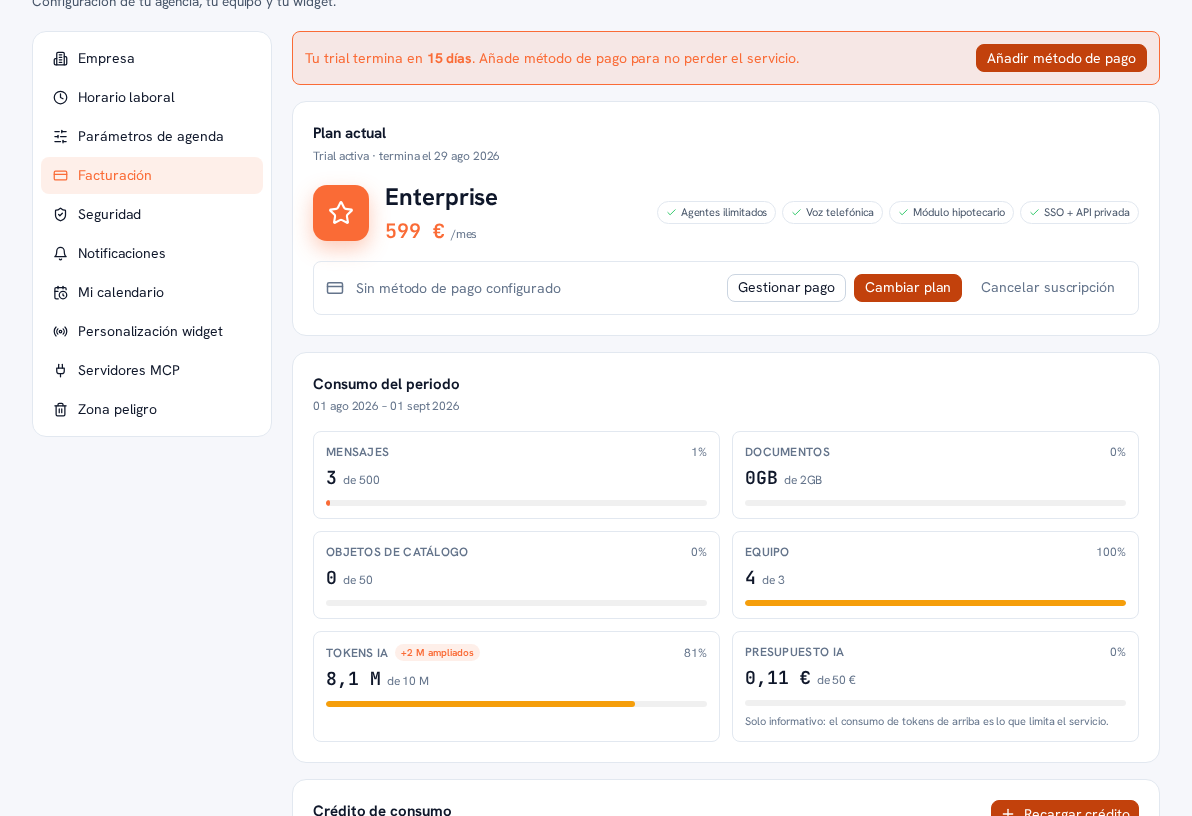
Below the plan, the Period usage panel shows progress-bar meters for the current calendar month (from day 1 to the last day of the month — not your Stripe billing cycle, which can start on any day):
| Meter | What it measures |
|---|---|
| Messages | NEW conversations started this calendar month (not each individual message within a conversation) against your plan’s limit: 500/month on Starter, 2,000/month on Pro, unlimited on Enterprise. |
| Documents | Space taken up by the documents you’ve uploaded, in GB. |
| Catalog objects | Items in your catalog (units, products, services… depending on your business type) against your plan’s maximum. Your catalog lives in your own systems, connected via MCP, so this meter usually reads 0. |
| Team | Your agency’s accounts against your plan’s maximum. |
| AI tokens | Real artificial-intelligence usage this month, measured in tokens against your plan’s monthly limit: 8M on Starter, 20M on Pro, unlimited on Enterprise. If your provider’s team grants you a one-off extension (section 6), the bar shows a “+N extended” chip next to the title and the limit rises for that month. |
| AI budget | The same AI usage expressed in €, informational only — a subtitle below the bar reminds you: “Informational only: the token usage above is what limits the service”. |
Tokens are the unit AI providers bill us for each use: every agent reply, reading your knowledge base, transcribing audio, and reading images all add up to tokens. They exist as a separate meter from Messages because two conversations can cost very different amounts of AI — a short text chat versus a long one with documents, audio and images involved — so, besides limiting how many new conversations you can open, your plan also limits how much real AI you can consume in the month, so the cost stays bounded whatever the type of conversation.
Messages and AI tokens are the two axes that trigger the notices and quota behavior in the next section. Documents, Catalog objects and Team are normal plan limits, with no associated behavior, and AI budget is purely informational.
Note — With a “Custom” plan (section 2), the bars still measure your real usage
The only thing that changes is the limit shown next to each meter: since a bespoke plan’s conditions aren’t exposed in detail here, you’ll see “(unlimited)” on all six meters, even though your real agreement with your provider does have specific caps — ask your operator if you want to know them precisely. Your usage (the large number on each card) is always still the real one, it genuinely counts what you spend.
Breakdown by source
Section titled “Breakdown by source”If you have Bring your own AI provider turned on (Manual 76), an additional “Breakdown by source” panel splits your AI usage for this period into three rows, each with its calls, input/output tokens and cost:
| Source | What it is | Cost |
|---|---|---|
| Platform | Conversations served with the AI included in your plan — the normal usage, the same one AI tokens and AI budget above already count. | The real cost in €, as always. |
| Your own key | Conversations served with your own key (Manual 76). Purely informational figure of calls and tokens, so you can see how much you use your provider. | “Not billed to your plan” — never a € amount, even with activity. That cost is paid by your AI provider, directly and outside your bill with the platform. |
| Fallback | Turns where your own key failed and the platform answered with its own so you weren’t left without a reply (Manual 76, section 6). | Billed as normal usage of your plan — it’s also added to AI tokens and AI budget above, never to “Your own key”. |
Warning — Only “Platform” and “Fallback” count toward your meters above
The AI tokens and AI budget meters in this same section only add up what’s served with the platform’s key — the “Platform” and “Fallback” rows — never what’s served with your own key. Even if “Your own key” shows real activity, those tokens don’t deduct anything from your monthly quota or raise your AI budget: they’re a separate figure, only so you can see how much you use your own provider.